AI Naming
In this article
Smart naming suggests names for a collection, based on the tabs in it. Pick one, change it if you like, and save.
Smart naming is one of Toby's Smart features, part of the Productivity and Team plans. To learn what Toby sends to suggest names, see Toby AI Practices.
Suggesting a name
-
Double-click the collection's name, or open its ··· menu and click Edit Title.
-
Click the sparkles button, Suggest names, next to the color picker.
-
The first time, click Enable to turn on Smart Features.
-
Click one of the Suggested names to put it in the name box, then click Save or press Enter.
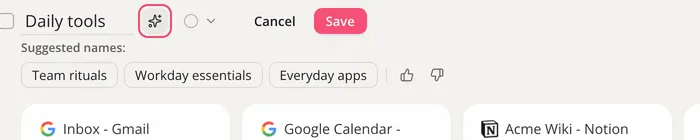
Click the sparkles again for a fresh set. Use the thumbs to tell us whether the suggestions were good.
When you click Save session on a window in Toby's Open Tabs panel, Toby suggests names for the new collection on its own, once Smart Features are on. For a session saved from the extension menu, use Suggest names after saving.
Smart naming needs at least one tab in the collection.