How to cancel your Toby plan
In this article
Toby plans belong to a workspace, not to your account. If you have more than one workspace, each one has its own plan and its own bill. So start by opening the workspace you pay for.
Only the workspace's owner or an admin can cancel its plan. If you're a member, ask the owner.
Cancelling your plan
-
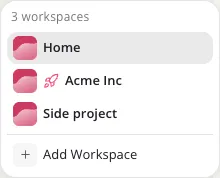
Click the workspace name at the top left and pick the workspace you pay for. Paid workspaces show a rocket icon next to their name.
-
Click Settings at the bottom of the left sidebar.
-
Under your workspace's name, click Subscription.
-
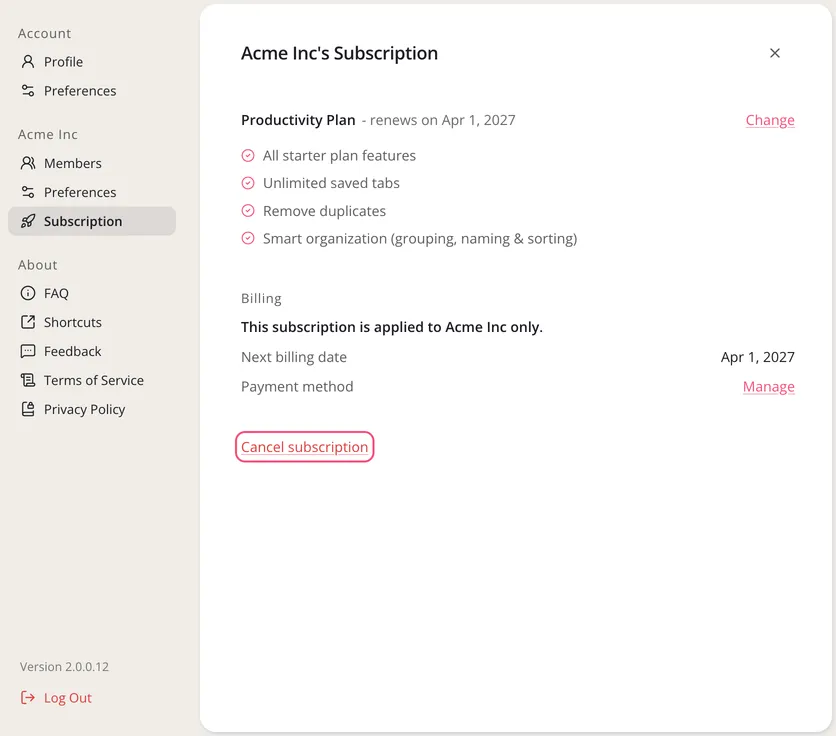
Click Cancel subscription at the bottom of the page.
-
Go through the short steps Toby shows you, then confirm on Stripe, our payment provider.
If you see Canceled instead of Cancel subscription, cancellation is already confirmed. If the plan shows an end date, you can keep using paid features until then.
If this workspace shows Starter Plan, there's no paid plan to cancel here. Go back to step 1 and pick the workspace you pay for.
What happens after you cancel
Your plan stays active until the end of the period you've already paid for. Then the workspace moves to the free Starter plan.
You don't lose anything you saved. The Starter plan holds up to 60 saved tabs. If the workspace has more than that, you can still open all of them, but you can't save new ones until it's back under 60.
You can upgrade again whenever you like.
If something goes wrong
Email us at hello@gettoby.com if you can't find your plan, or if a renewal payment failed and you still get payment emails after cancelling. Tell us the email address you sign in with and we'll take care of it.